TL;DR
- Feed Google better data. First-party lists, conversion tracking, and consent work only when set up correctly.
- Let automation work, including setting smart bidding, broad match, and Performance Max.
- Keep ads tight with one objective, clear message, strong CTA, and assets like sitelinks.
- Optimize your ads’ click path. This includes fast landing pages, message match, mobile-first, and low-friction UIs.
- Give campaigns a budget, time, and enough data to learn.
Keeping up with Google’s ad changes can feel like a full-time job. It feels like every week there are new updates to get to grips with, and the tactics that were successful two years ago aren’t the same as today.
So how do you know you’re using the most up-to-date methods?
Here’s a collection of the best practices that keep you ahead of your marketing game this year, including the top tools and integrations you need to automate your lead generation data, such as:


What is Google Ads?
Google Ads is an online advertising program that allows companies to pay to get their sites listed in the search results. You can set up and run online ads by choosing the keywords you want to target so that people searching those terms will see your website.
Running Google Ads is a great way to drive qualified traffic to your site and attract good-fit customers who are looking for exactly what you’re selling without having to wait until you rank organically. In fact, you can start generating traffic immediately.
Google has a library of different ad types you can run, but these are the most popular:
- Responsive search ads: Input multiple headlines and ad copy and let Google automatically test and choose the winning combination.
- Dynamic search ads: Target searchers based on their unique search terms and serve the most relevant landing page (particularly good for ecommerce brands with multiple SKUs).
- Display ads: Serve ads on relevant websites using eye-catching images and ad copy.
- Video ads: Run an ad campaign on YouTube or on websites and apps that use Google Video Partners.
- Shopping ads: Create product-focused ad campaigns that show up at the top of the search results.
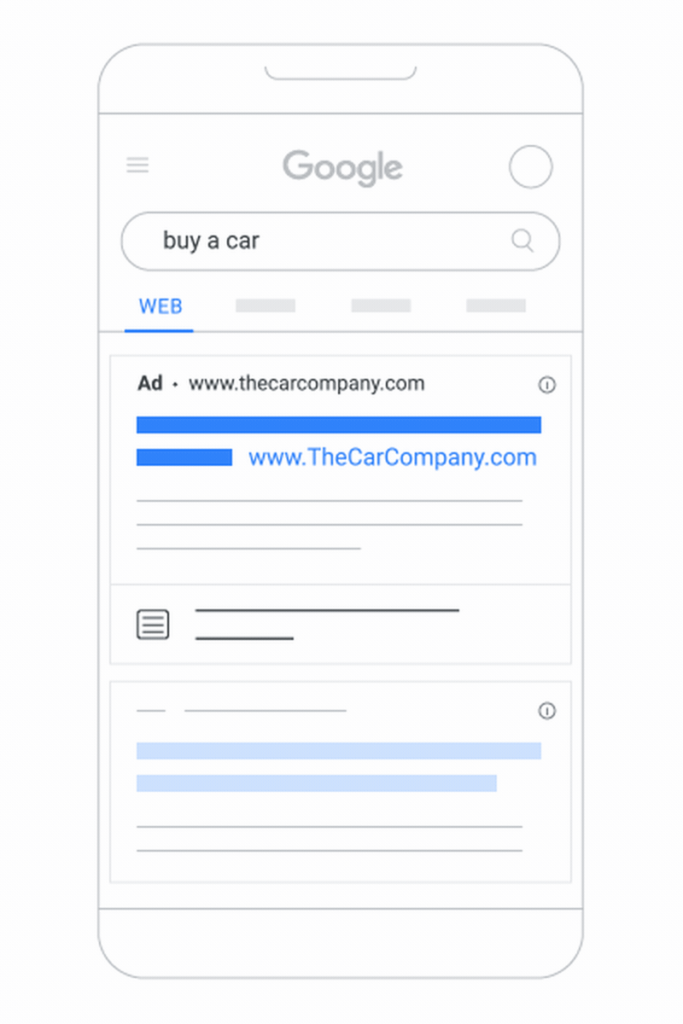
Here’s a real-life list of Google Ads examples.
The best way to use Google PPC
Google PPC (or Google’s pay-per-click) is an advertising solution where businesses bid on keywords relevant to their brand to show up in the SERPs—you only pay when someone clicks on an ad.
There are several ways you can benefit from PPC campaigns:
- Target past website visitors, app users, or customers
- Target people who are searching for your brand name
- Target people who are similar to and match your existing segments
- Target people at different stages of the funnel
For all of these approaches, you have to choose relevant keywords, set a daily budget, and choose how much you’re willing to pay per click.
12 Google Ads best practices
Running Google Ads doesn’t require several skills. Your keywords decide who sees the ad, your copy decides whether they click, and your landing page decides whether that click was worth paying for. If you happen to get one of them wrong, the rest cannot really help the performance.
So here are 12 sets of best practices, grouped by the part of the account they fix. Start with whichever one is losing money.
1. Google Ads keyword best practices
The first step in setting up a Google Ads campaign is choosing the right keywords. This will determine which searches your ads may be eligible to show for and ultimately impact who you’re targeting.
For example, if you target the keyword “how to make tea”, you’re going to generate traffic from people who are looking for educational content. If you choose the keyword “relaxation teas”, you’re more likely to reach people who are actively looking to buy tea.
Use these Google Ads keyword best practices to choose the best, most relevant keywords.
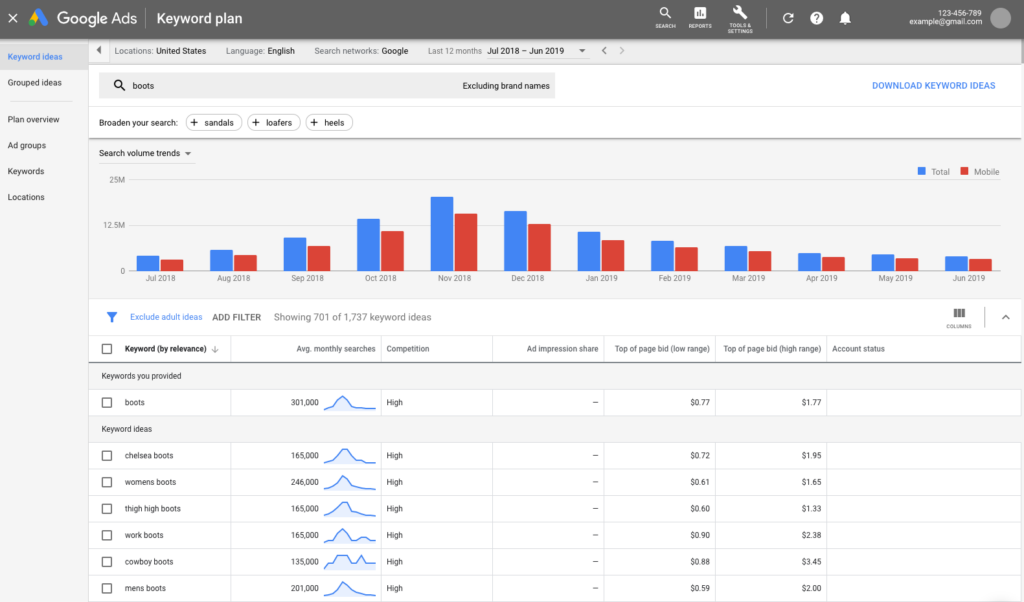
- Use Google’s Keyword Planner. The tool will then suggest relevant short and long-tail keywords that you can use.
- Think like your customers. Dig into your analytics to find out what people are searching for.
- Use a keyword research tool like Ahrefs or SEMrush, to drill down into search intent and find competitor content gaps you can fill. For companies that build their own marketing tools or require real-time SERP data for competitive analysis, specialized platforms like HasData provide direct API access to Google search results.
- Exclude negative keywords. Choose words that aren’t relevant to your brand to exclude from search terms.
- Consider search volume vs. competition. Choose keywords that have a relatively high search volume but have low competition in comparison.
2. Google Ads negative keyword best practices
Negative keywords let Google know which search terms you don’t want. With the current updates, they matter even more than they used to.
Broad match and AI Max reach much further than they did a few years back, and Google hides a chunk of your search terms for privacy reasons. So you’ve got more traffic coming in and less visibility into it.
Basically, having a good negative list is what keeps that from turning into wasted money.
1. Start with your own search terms report.
Pull the report weekly for new campaigns and anything spending real money. Once things settle down, every two weeks is fine.
Having a downloaded list is okay if you are using it as a starting point, but you need to build your own for the best keywords. Your data beats any template every time.
You can organize your lists as account-level vs. campaign-level keywords:

2. Don’t use negative keywords like normal ones
Regular keywords go a long way. Type in “mountain bike” and Google will match searches that mean the same thing, even if the words are totally different.

Negative keywords don’t do that. Google handles capital letters and misspellings for you, but that’s it. You have to add synonyms and singular or plural versions yourself.
So if you block “trekking,” you have not blocked “trek.” If you block “e-bikes,” you have not blocked “electric bikes” and so on. It’s tedious, but you need to add every version you care about.
3. Pick the right match type
- Broad negative: Blocks any search with all your words in it, in any order. Bluntest option.
- Phrase negative: Blocks searches with your exact phrase in them, in that order.

- Exact negative: Blocks only that one exact search. Use it when a term is usually fine but wrong in one specific form.
Start narrow and widen your list if the negative keywords grow in number. It’s easier to loosen a negative than to figure out why your best keyword suddenly doesn’t work for you anymore.
4. Don’t get too strict
Negatives beat your regular keywords. If a negative shares a word with something you’re bidding on, the negative wins and your keyword stops showing. Before you add anything, check it against your active keyword list.
Blocking too much also starves Smart Bidding. It needs conversion data to learn. Choke off the traffic, and you choke off the learning.
5. Use lists for specific search terms
Build a shared list of terms that are dead weight across your whole account. Things like “free,” “cheap,” “DIY,” “jobs,” “salary,” “reviews,” and “how to,” depending on your business. Apply it account-wide.
Keep campaign-specific negatives at the campaign level. “Commercial” might be junk for your residential campaign and your best term in the commercial one.
6. Performance Max has its own negatives now
This used to mean emailing your Google rep and waiting. Now you add them yourself, right in the campaign, up to 10,000 per campaign.
Keep in mind that:
- PMax negatives only apply to Search and Shopping inventory, not YouTube, Display, or Gmail
- PMax also has its own search terms report, so check that one separately.
7. Use brand exclusions for branded searches
If your goal is to stop showing up for competitor names or your own brand terms, brand exclusions are the right tool. They’re built for it and they’re cleaner to manage.
8. Different tools for Demand Gen and Display
Negative keywords behave differently outside Search. For Display and video, Google only counts up to 1,000 account-level negative keywords, and they work more like topic blocks than exact word blocks.
3. Google Ads landing page best practices
Your ad only gets the click. The landing page does the actual selling. Here’s how to build high-converting ads.
1. Keep it relevant
- Match ad copy: Ensure the landing page headline aligns with the ad copy and the user’s search intent.
- Focus on one offer: Avoid overwhelming visitors with multiple offers or calls-to-action (CTAs).
- Match the look as well: Use the same colors, fonts, and branding the person just clicked on. If the ad and the page feel like two different companies, people bounce.
2. Optimize for speed
- Fast loading time: Aim for a page load time of under 3 seconds.
- Minimal distractions: Remove unnecessary elements that could slow down the page or distract visitors.
3. Prioritize mobile-first design
- Responsive layout: Make the page look great on all devices, especially mobile.
- Easy navigation: Ensure buttons and CTAs are easy to click on smaller screens.
4. Have a clear and compelling headline
- Immediate value proposition: Highlight the benefit of your offer in a concise and compelling way.
- Hook the visitor: Use power words or numbers to grab attention (e.g., “Save 50% Today!”).
5. Include strong Call-to-Actions (CTA)
- Make it visible: Place your CTA above the fold and repeat it further down the page.
- Action-oriented language: Use verbs like “Download,” “Get Started,” or “Claim Now.”
6. Minimize friction
- Simplify forms: Ask only for essential information (e.g., name and email).
- Provide trust signals: Use testimonials, case studies, or security badges to build trust.
- Cut the navigation: Take out your menu, footer links, and anything else that gives people a way to wander off. The only real exit should be your CTA.
7. Set a visual hierarchy
- Highlight key elements: Use bold colors, contrasting buttons, and white space to guide the visitor’s attention.
- Use images/videos: Show visuals that complement your offer, such as product demos or customer success stories.
8. Give people a good reason to act now
- Use real urgency: A deadline, a countdown, or low stock can push someone to decide today instead of “later,” which usually means never.
- Keep it honest: Those fake timers that reset every time the user refreshes negatively affect a site’s trustworthiness. Google’s policies don’t allow misleading claims either, so it’s not worth the risk.
9. A/B test continuously
- Headline testing: Experiment with different headlines to see what resonates best.
CTA variations: Test button colors, placement, and wording.
4. Google Ads management best practices
Now, let’s go over some Google Ads management best practices to keep in mind when setting up and running Google Ads in 2026. 26.
1. Automate your ad campaigns with a tool that automatically optimizes your campaigns and uses data from existing customers to make sure you’re targeting the right people.
2. Choose one goal for each ad and use that to craft your ad copy, landing page copy, and CTA.
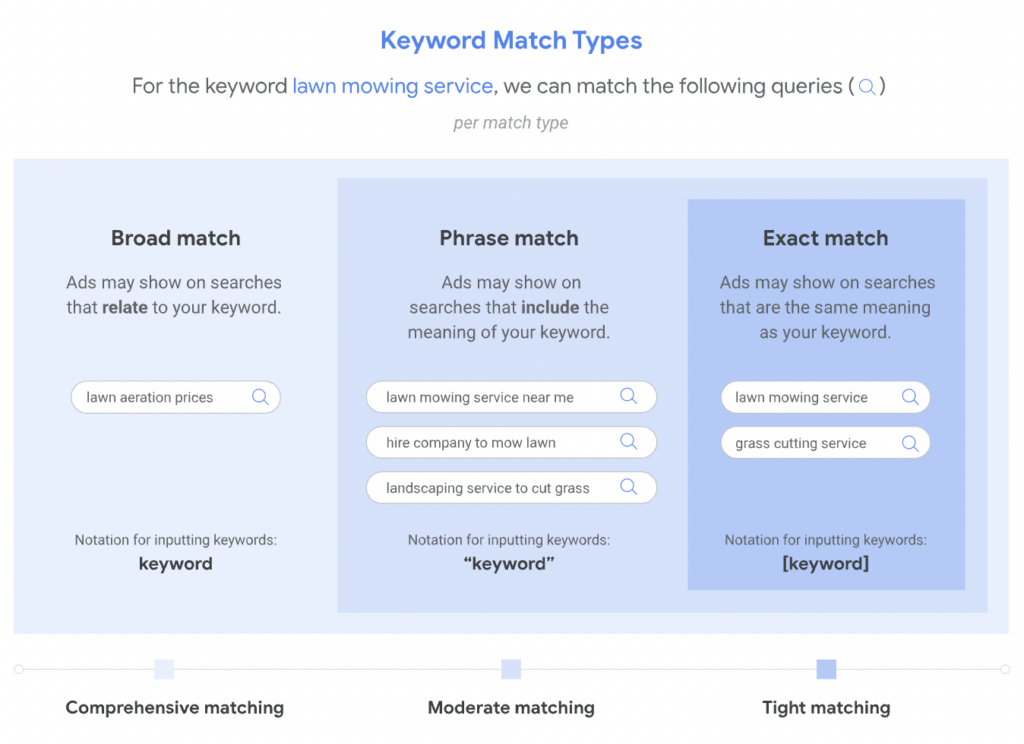
3. Use broad match keywords since sometimes searchers won’t type in the exact keyword you want, but broad match keywords still serve your ads to the right people.
4. Let Google’s automated solutions do the hard work with solutions like optimized targeting, audience expansion, and Smart Bidding–all of which are geared toward optimizing your marketing objectives.
5. Eliminate keywords that aren’t performing well to reduce your budget and optimize your campaigns.
6. Use first-party data to tighten up your targeting, including your CRM, Google Ads lead forms, and social media platforms, and integrate it with Google to provide a comprehensive view of who you want to target.
7. Create groups of similar ads and use the corresponding ad copy for each of them. This will help you streamline your efforts and ensure your messaging remains consistent across similar campaigns.
8. Remarket to people who already know and love your brand–they already trust you and are more likely to click and buy.

5. Google ad copy best practices
Writing effective Google Ads copy requires a blend of creativity, clarity, and adherence to platform guidelines. Here are some Google ad copy best practices to make your ads stand out and drive results.
1. Understand your audience
- Know their pain points: Highlight how your product or service solves their problem.
- Speak their language: Use words and phrases your audience uses, ensuring relevance and relatability.
- Tailor messaging: Align your ad copy with your target audience’s stage in the buyer’s journey (awareness, consideration, decision).
“You’re not writing ads for Google. You’re writing them for people. If it doesn’t speak to a real need or emotion, you’ve lost the click.” — Chris Fawcett, President of Third Marble Marketing
2. Prioritize clarity and relevance
- Match the search intent: Make sure your ad copy aligns with the keywords you’re targeting.
- Be specific: Instead of general promises, use concrete details (e.g., “Save 20% on running shoes today”).
- Use dynamic keywords: Incorporate keywords dynamically to make the ad feel more personalized.
3. Highlight benefits and value
- Focus on benefits over features: Tell users what they’ll gain or how their lives will improve. For example: Instead of “High-speed internet,” say “Stream your favorite shows without buffering.”
- Include offers or promotions: Discounts, free trials, or limited-time offers can entice clicks.
- Use unique selling points (USPs): What makes your product or service stand out? Emphasize it.
4. Write compelling headlines
- Use action-oriented language: Start with verbs like “Discover,” “Get,” “Start,” or “Save.”
- Create urgency: Phrases like “Limited Time Offer” or “Only a Few Left” can drive action.
- Make it personal: Use “you” or “your” to speak directly to the user.
5. Use extensions for more impact
- Sitelink assets: Showcase additional pages (e.g., “Pricing,” “Contact Us”).
- Callout assets: Highlight features like “Free Shipping” or “24/7 Support.”
- Structured snippet assets: List specific aspects like product categories or services.
- Call assets and location assets: Make it easy for users to contact or find you.
6. Include a strong Call-to-Action (CTA)
- Be direct: Use CTAs like “Shop Now,” “Learn More,” “Sign Up,” or “Book Today.”
- Create urgency: Combine CTAs with time-sensitive language (e.g., “Claim Your Offer Before Midnight!”).
- Ensure alignment: Your CTA should align with the action you want users to take on your landing page.
7. Optimize for mobile
- Keep it concise: Mobile screens have less space, so avoid long sentences.
- Use mobile-preferred extensions: Make it easy for mobile users to call or visit your location.
8. Test and iterate
- A/B test headlines and descriptions: See what resonates best with your audience.
- Experiment with offers and CTAs: Small tweaks can lead to significant results.
- Analyze performance data: Monitor CTRs, conversion rates, and quality scores to refine your approach.
9. Follow Google’s policies
- Avoid:
- Misleading claims or exaggerated language.
- Capitalizing entire words (unless brand-specific).
- Excessive punctuation like “!!!” or “###.”
- Adhere to character limits:
- Headlines: 30 characters (max per field).
- Descriptions: 90 characters.
These Google ad copy best practices can help you create Google Ads copy that captures attention and drives meaningful clicks and conversions.
6. Google Ads description best practices
Your descriptions should include context and proof, and nudge the reader to act.
Here are all the elements you may include in your description when you see fit:
- It offers problem-solving value instead of boasting about features.
- The benefit stays visible before truncation on mobile.
- Includes your primary keyword (if it fits) and has no keyword stuffing; clarity beats repetition.
- Adds specific terms such as numbers, timeframes, or qualifiers (“In 24 hours,” “Backed by 2-year warranty”) to boost credibility.
- Makes the CTA unmissable and uses action verbs that align with the landing page: “Get a Free Quote,” “Book a Demo,” “See Pricing.”
- Stands on its own and in any order, since responsive search ads will mix and match.
- The current description limit is 90 characters per field. Put the hook first and details second in plain sentence case, short phrases, symbols where helpful (%, $, #).
- Has one CTA description, if compliance or sequencing matters. Otherwise, let assets rotate.
- Avoids using excessive punctuation, jargon, ALL CAPS, or unverifiable claims. Also, avoid trademark issues.
- Calls out geo, audience, or offer qualifiers (“For SMBs,” “EU-Compliant,” “Free shipping over $50”).
7. Google search ads best practices
Looking to make your Google Search ads pop? Find out how to get your ads from average to high-performing:
1. Use responsive ads with an Ad Strength of ‘Good’ or ‘Excellent’ in each ad group. To aid in this improvement, consider enabling text customization.

2. Google suggests adding at least four different image assets to your ads. Images help give a clear idea of what you’re selling right from the get-go.
3. Include your business logo and name. Leading with clear brand assets (logo, jingle, mascots) is the most effective for brand building and conversion in short-form ads.
8. Display ads best practices
In May 2026, Google said Display campaigns are moving into Demand Gen. A migration tool showed up in accounts in June 2026. After that, you won’t be able to build new Display campaigns at all, and Google will move over whatever’s left on its own. The whole thing wraps up in 2027.
The Display Network itself isn’t shutting down. You can still run ads only on Display inventory. It just lives inside Demand Gen now.
If you’ve got Display campaigns running, move them yourself instead of waiting. That way you pick the timing and you can clean up your creative first. Sort out anything the tool doesn’t support, like lead forms and shared budgets, before you hit go, or the migration will stall.

Either way, the advice below still applies. Good Display creative is good Display creative, whichever campaign type it sits in.
Google Display Ads can show up across more than 2 million sites, videos, and apps, plus places like Gmail and YouTube. Here’s what Google recommends.
1. Give Responsive Display ads plenty to work with. You hand over headlines, descriptions, images, and logos, and Google mixes them into ads that fit whatever space is available. The more good pieces you give it, the more places your ad can show.
2. Use sharp, high-quality images. Skip anything blurry, heavily filtered, or stretched out of shape. If you need creative fast, AI ad generator tools can spin up compliant visuals and copy variations for you.
A few things to keep in mind:
- Don’t stack stuff on your images. Keep logos and text off them. Google adds its own headline and description on top, so anything you put there just makes a mess.
- Make the product the star. Your offer should be the thing people notice, not lost in the background or floating in empty space.
- Keep it simple. Real settings, real photos, nothing fussy.
3. Upload all three image ratios. Landscape (1.91:1), square (1:1), and portrait (4:5). You can upload up to 15 images per ratio. Skip one, and you lose placements, especially on mobile.
Sizes to use:
- Landscape: Ideal 1200 x 628, minimum 600 x 314.
- Square: Ideal 1200 x 1200, minimum 300 x 300.
- Portrait: Ideal 960 x 1200, minimum 480 x 600.
- Max file size: 5120 KB for all of them.
One more thing: Google crops your images to fit different slots. Keep the important part in the middle of the frame or it’ll get chopped off.
4. Keep logos clean. Crop tight to the logo itself, no extra decoration or busy backgrounds, and stick to the aspect ratios Google supports. Square (1:1) is the main one. A wide version (4:1) is worth adding too.
9. Google Demand Gen best practices
Following the discontinuation of Discovery campaigns, Google merged them into Demand Gen, which basically works in very similar ways:
Demand Gen ads run on YouTube (including Shorts), Discover, Gmail, Google Maps, and now the Display Network. Google says that reaches about 3 billion people a month.
- Use Smart Bidding. Maximize Conversions, Target CPA, and Maximize Clicks are all options. Pick the one that matches your goal, then leave it alone long enough to learn.
- Provide it with solid creative assets. Single images, carousels, and short vertical video all work here. Thin creative shows up fast on these surfaces because the system tests many assets at once.
- Upload every image ratio. Landscape (1200 x 628), square (1200 x 1200), and portrait. Skip one and you lose placements.
- Check asset-level and channel-level reports. Google added channel controls, so you can see which surface is spending your money and turn off the ones that aren’t working.
- Reuse content that already did well organically. If a video performed on your channel, it’s a good bet here.
10. AI Max for Search best practices
AI Max is a set of AI features you switch on inside your existing Search campaigns. It finds searches your keywords miss, writes ad copy on the spot, and picks the best landing page for each search. It came out of beta on April 15, 2026.

It’s also not really optional. Google auto-upgraded campaigns using automatically created assets or campaign-level broad match in September 2026, and Dynamic Search Ads follow in February 2027.
The only question is how you can set it up on purpose.
- Fix your conversion tracking first. AI Max learns from your conversion data. Bad data means it optimizes hard toward the wrong thing.
- Set your controls before the upgrade. You still get negative keywords, brand controls, location controls, text guidelines, and URL expansion settings. Easier to set now than to scramble later.
- Turn on the full feature set. Google says all three features together bring about 7% more conversions at a similar CPA. That’s Google’s own number, so treat it as a claim. But the pieces do work better together.
- Check search terms weekly at first. AI Max reaches further than your keyword list, so junk gets in that never did before. Block it.
- Put guardrails on URL expansion. Exclude old, thin, or out-of-stock pages, or you’ll send paid traffic somewhere embarrassing.
- Judge it at the account level. An AI Max campaign can look great while your account stays flat, because the wins came out of your other campaigns.
Another thing to keep in mind is that your ads can show up in AI results now.
Google runs ads above, below, and inside AI Overviews. If you’re running Search, Shopping, Performance Max, or App campaigns, you’re already eligible. Ads in AI Mode are newer and still being tested in the US.
There’s no report for this yet. Watch your overall CPC and conversion trends and notice when something shifts without an obvious reason.
11. Google Ads sitelinks best practices
Use sitelink assets instead of generic links. Google Ads sitelinks work best when they feel useful.
Google recommends adding at least four sitelink assets with descriptions across your ad groups and campaigns, and using six gives your ads a better chance of showing more sitelinks when eligible.
Above all, make each one worth the click. You also need to send people to different pages, not the same one over and over.
Additionally, do not skip the descriptions. They give Google more to work with, and they give searchers more reasons to click.
A Google Ads sitelinks best practice is to match sitelinks to the campaign or ad group, so the links actually fit the search.
12. Google Ads Performance Max best practices
Performance Max does better when you give it a clear direction. To do that, you need to first build asset groups around clear themes, products, or audiences.
This means you’ll be creating:
- Strong creative
- Good images
- Optimized video
Then leave the campaign alone long enough to learn. Google recommends giving a new campaign at least six weeks before you judge it, and major changes can kick it back into a shorter learning phase.
Use audience signals to point the system in the right direction. Keep in mind, these signals are just hints and cannot replace your Google targeting strategy. Also, remember to refresh assets before promos.
Google Ads trends to watch in 2026
Three trends are changing how accounts run this year. Here’s what’s changing and what to do about each.
1. Google is lowering the number of campaign types
Google is folding a dozen campaign types into a handful of AI-run ones. Search ends up on AI Max, everything visual ends up in Demand Gen.
- Discovery became Demand Gen in 2024. Video Action campaigns followed in 2025.
- Display is next. Announced May 26, 2026, with a migration tool in accounts starting in June. Auto-migration runs into 2027.
- Campaign-level broad match and automatically created assets moved to AI Max in September 2026. You can’t create new ones.
- Dynamic Search Ads follow in February 2027. New DSA creation closes in January.
- What to do: Migrate on your own schedule. You pick the timing, clean up creative first, and watch performance while things are calm. Wait for the auto sweep, and you inherit whatever Google picks, possibly mid-Q4.
2. Third-party cookies are staying, but Privacy Sandbox is no longer available
Google retired ten Privacy Sandbox tools in October 2025, and Chrome finished removing them in July 2026. Cookies stayed. That’s not permission to relax — consent laws haven’t changed, and Safari and Firefox never allowed third-party cookies anyway.
- Put the Google tag on every page, through gtag.js or Tag Manager.
- Make sure your consent tool sends ad_user_data and ad_personalization. Google recommends checking with Tag Assistant.
- Set up Enhanced Conversions. Accept the Customer data terms first, then configure through GTM or the Google tag.
- Keep building first-party lists. That’s the asset no platform change can take away.
3. AI runs the account, but you’re still responsible for it
Google updated its Ads terms on July 1, 2026. It can now format, select, and generate your ads and landing pages from what you give it. Reviewing and removing what it creates is still your job.
Feed it clean data. Less segmentation helps these systems learn, but only if you’re optimizing for conversions that actually make money and your bid strategy has a real CPA or ROAS target.
Set your brand controls. Brand guidelines, business name, and logo govern what AI formats can produce.
Mark October 12, 2026. Business name and logo become required for YouTube responsive ads unless you’ve set default branding at the advertiser level.
Check what Google writes. Automatically created assets can lift ad strength, but switch off anything off-brand.
Try Asset Studio if you need creative volume. It builds full asset sets from your brand guidelines and site.
Google Ads automation benefits
Running Google Ads can become incredibly time-consuming if you’re constantly in your account tweaking keywords and updating your targeting selections. But if you automate the process, you can scale your ad efforts while ensuring you continue to reach the right people.
The benefits of marketing automation for Google Ads:
- Boost ad performance by automatically optimizing and tweaking ad campaigns
- Cut advertising costs by automatically removing irrelevant keywords and low-performing ads
- Scale campaigns by duplicating existing ads
- Save time by leaving campaigns to run by themselves (no need to keep going back into your account to tweak them!) To ensure that your team is well-equipped to leverage the latest advertising technologies, consider enhancing their skills with specialized courses.
But where do you start?
LeadsBridge’s Google Ads integrations
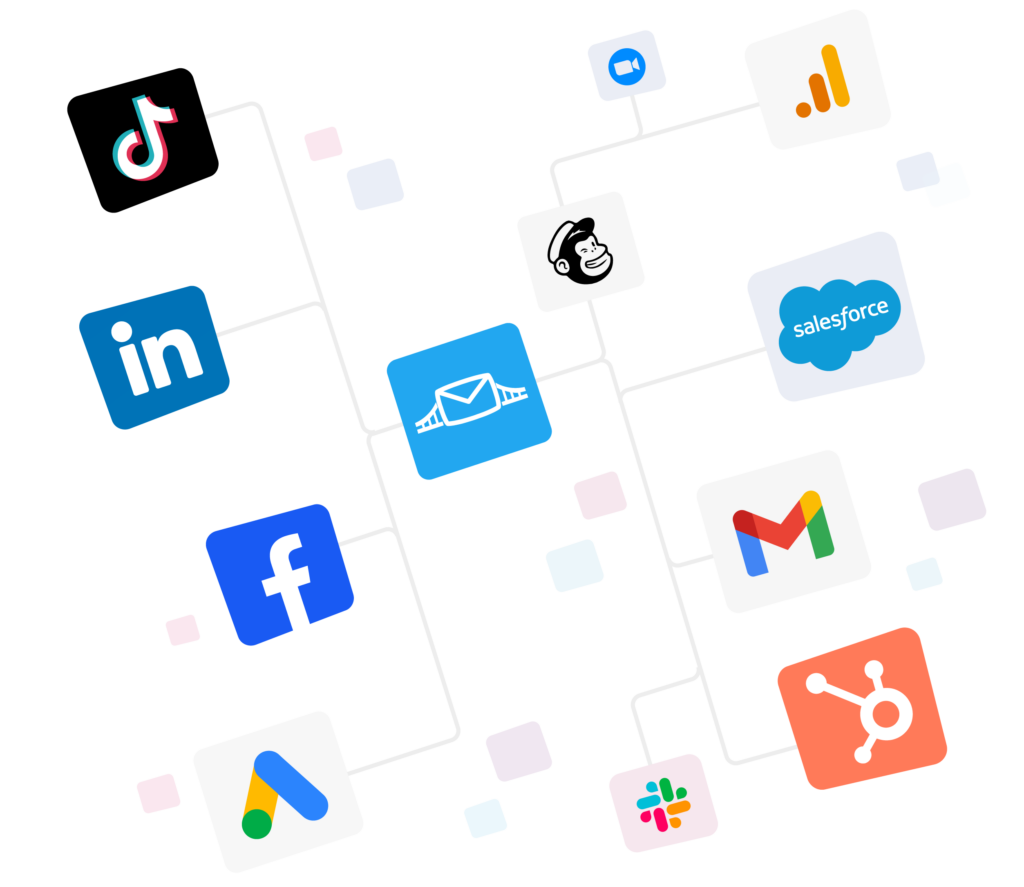
LeadsBridge has a library of integrations that help streamline Google Ads campaigns:
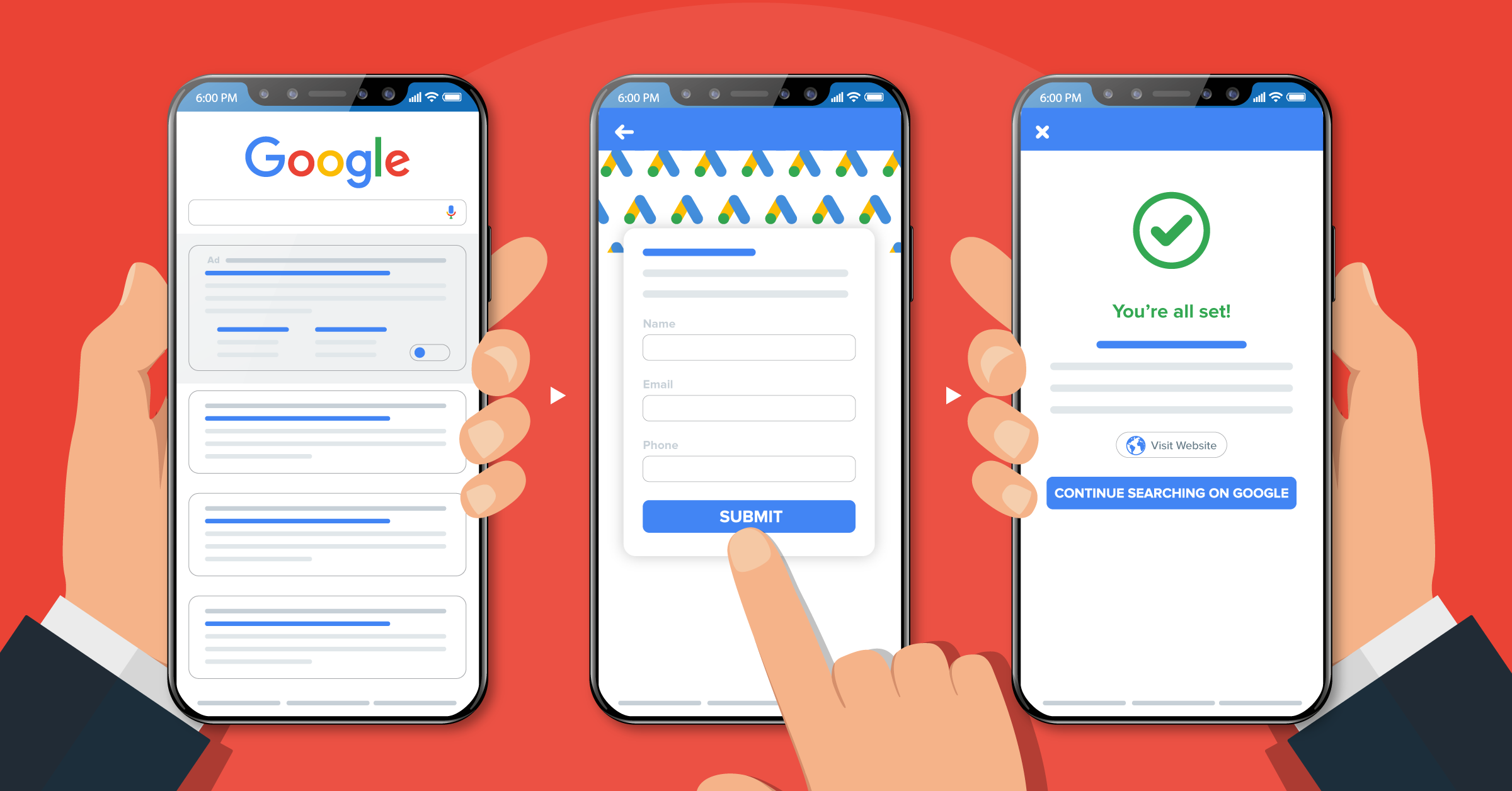
Google Ads lead forms extensions: Integrate lead forms from other platforms, spreadsheets, and your CRM with Google Ads to populate your target audience and make sure you’re reaching people who already know who you are (and are, therefore, more likely to click).
Speaking of your leads’ data, here’s how to download leads from Google Ads.


Google Customer Match: Match your first-party list to signed-in users to ensure you’re targeting good-fit prospects and people who are likely to be interested in your products and services.
Here’s a detailed guide to using Google Customer Match.
And if you want to jump right into your data bridge building, here’s how to connect your favorite CRM to Google Customer Match.


YouTube Trueview for action form ads: Integrate leads from existing lead gen forms and other platforms with YouTube to serve ads to relevant people.

The integrations are designed to bridge the gap between advertising platforms (like Google) and your chosen marketing tools which, as you can imagine, removes a ton of the tedious, manual labor.
Advantages of using LeadsBridge integrations with Google Ads
LeadsBridge essentially gives you complete clarity over your entire Google Ads strategy and the powerful integrations can help you:
- Increase your revenue by automatically guiding new leads through the funnel
- Reduce the number of manual tasks you and your team need to do (so you can spend more time on activities that actually move the needle)
- Increase team efficiency by creating a slick, optimized ad funnel
- Save time by automatically populating your Google Ads with audience data and information from other marketing tools
- Reduce human errors with watertight connections between your favorite marketing tools and Google Ads
FAQs about Google Ads best practices
In Google Ads, these basics still carry the account. The most important Google Ads best practices are:
1. Track the right conversions
2. Match your ads to the landing page
3. Add useful assets like sitelinks
4. Give campaigns enough budget and time to learn
5. Stop making constant edits.
Start with enough budget to get real data. A solid rule is enough for at least 10 clicks a day.
Performance Max campaigns often struggle if they are below about $1,500 to $2,000 per month. But your CPC and conversion rate matter more than any blanket number.
For Performance Max, Google says to give a new campaign at least six weeks to learn and stabilize. If you make major changes, expect another one to two weeks, or one full conversion cycle, before performance settles again.
Takeaways
Google Ads remains an effective way to reach new customers and stay front-of-mind with existing customers. Use these Google Ads best practices to give your campaigns the best chance of success and automate the process with powerful integrations from LeadsBridge.
As an official Google Partner, our integrations work seamlessly with your ad campaigns to improve results and continue to optimize your new and existing campaigns.
See all of LeadsBridge’s integrations for Google Ads.